.png?width=600&height=315&name=demographic_segmentation-BLOG%20(1).png)
Here's a stat that should make you rethink your next email blast: segmented email campaigns generate 760% more revenue than one-size-fits-all sends.
And yet, most ecommerce brands still send the same email to their entire list.
Same subject line. Same product recommendations. Same offer.
Whether the recipient is a 22-year-old college student or a 55-year-old empty nester with completely different needs, budgets, and buying triggers.
That's where demographic segmentation comes in.
Demographic segmentation is the practice of dividing your audience into groups based on measurable, fact-based characteristics like age, gender, income, education, occupation, and family status.
It's different from behavioral segmentation (which groups people by what they do) or psychographic segmentation (which groups them by what they think and value). Demographic segmentation groups your audience by who they are.
That distinction matters. Because "who they are" determines what they can afford, what they need, what resonates with them, and when they're most likely to buy.
Here's what we'll cover in this guide:
- The 7 types of demographic segmentation with real ecommerce examples you can steal
- How to collect demographic data for your store (even if you're starting from zero)
- How to turn that data into automated email campaigns that convert
Whether you're brand new to audience segmentation or looking to sharpen your demographic targeting, this is the playbook.
What You'll Learn
- What Is Demographic Segmentation?
- The 7 Types of Demographic Segmentation (with Ecommerce Examples)
- How to Collect Demographic Data for Your Ecommerce Store
- How to Use Demographic Segmentation in Email Marketing
- Getting Started: A 5-Step Implementation Checklist
What Is Demographic Segmentation?
Demographic segmentation is a type of market segmentation that divides your audience based on factual, observable characteristics: age, gender, income, education, occupation, family status, and location.
For ecommerce brands, it's the difference between sending a "New Arrivals" email to everyone on your list and sending age-appropriate product recommendations to a 25-year-old versus a 50-year-old. Same store, same catalog, completely different email.
But demographic market segmentation doesn't exist in a vacuum. It's one of four major approaches to customer profiling, and understanding how they fit together will make you a sharper marketer.
How Demographic Segmentation Compares to Other Types
| Segmentation Type | Segments By | Best For | Data Source |
|---|---|---|---|
| Demographic | Who they are (age, gender, income) | Personalizing messaging and product recommendations | Signup forms, surveys, purchase data, zero-party data |
| Behavioral | What they do (browsing, purchasing, email clicks) | Triggered automations and retargeting | Website tracking, email engagement, order history |
| Psychographic | What they think (values, interests, lifestyle) | Brand positioning and messaging tone | Quizzes, surveys, social media analysis |
| Geographic | Where they are (country, region, climate) | Localized offers, seasonal campaigns, shipping logic | IP address, billing/shipping address, timezone |
Notice that behavioral vs demographic segmentation isn't a competition. They answer different questions. Demographics tell you who's in your audience. Behavior tells you what they're doing.
The most effective ecommerce email strategies layer both. But demographics come first, because they're based on facts, not assumptions. You know someone's age or location. You're inferring their intent from a page view.
That's why demographic segmentation is foundational. It gives you a stable, reliable starting point that you can enrich with behavioral and psychographic data over time.
The 7 Types of Demographic Segmentation (with Ecommerce Examples)
Not all demographics in marketing carry equal weight. Depending on what you sell, some will be transformative for your targeting. Others won't move the needle.
Here are the seven core types of demographic segmentation, each with a real-world ecommerce example showing how brands put them to work.
1. Age Segmentation
Age-based segmentation does two things for your marketing.
First, it helps you decide which platforms to prioritize. TikTok skews heavily toward 18 and 19-year-olds, while Instagram pulls equally from the 18-24 and 25-34 demographics. Knowing where your age segments spend time determines where you should show up.
Second, it lets you tailor your messaging to different life stages and economic realities.
One survey found that younger audiences are significantly more worried about the economic climate and cost-of-living crisis than older generations. Just 8% of Gen Z respondents said they haven't changed their non-essential spending habits, compared to 14% of Baby Boomers and 25% of the Greatest Generation.
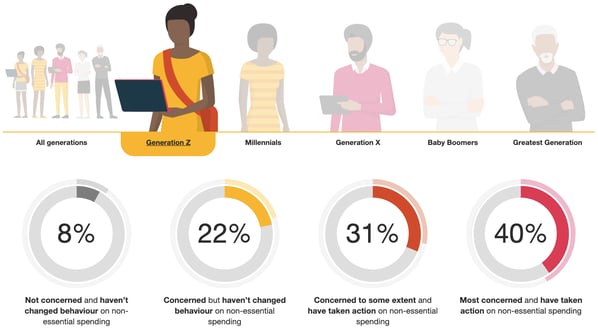
If you're targeting younger consumers, you'll need to work harder to encourage discretionary purchases. That means leaning into value messaging, social proof, and offers that make the purchase feel justified.
Ecommerce example: Yoga brand Sweaty Betty shows how to appeal to cost-conscious younger shoppers. Their email uses a customer testimonial emphasizing product versatility (making yoga bras feel like wardrobe essentials, not luxury items) paired with a multi-buy savings offer.
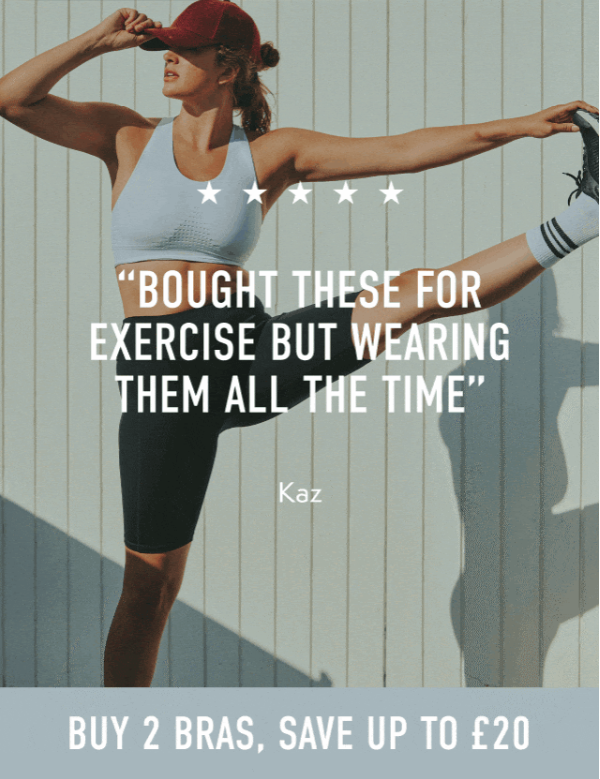
The combination of social proof and bundled discounts addresses the economic anxiety younger shoppers feel while driving higher average order values. Win-win.
2. Gender Segmentation
We've come a long way from the days when gender-based segmentation meant pushing cleaning products to women and suits to men.
Gender exists on a spectrum, and smart brands avoid rigid "products for men" vs. "products for women" thinking. But your audience data will still reveal products, messaging, and offers that resonate differently across gender segments.
Ecommerce example: Fashion brand Italic sells to all genders but frequently uses gender segmentation to surface relevant products. In one campaign, they curated a selection of pieces—including the Elise trench coat—specifically for their women's segment.
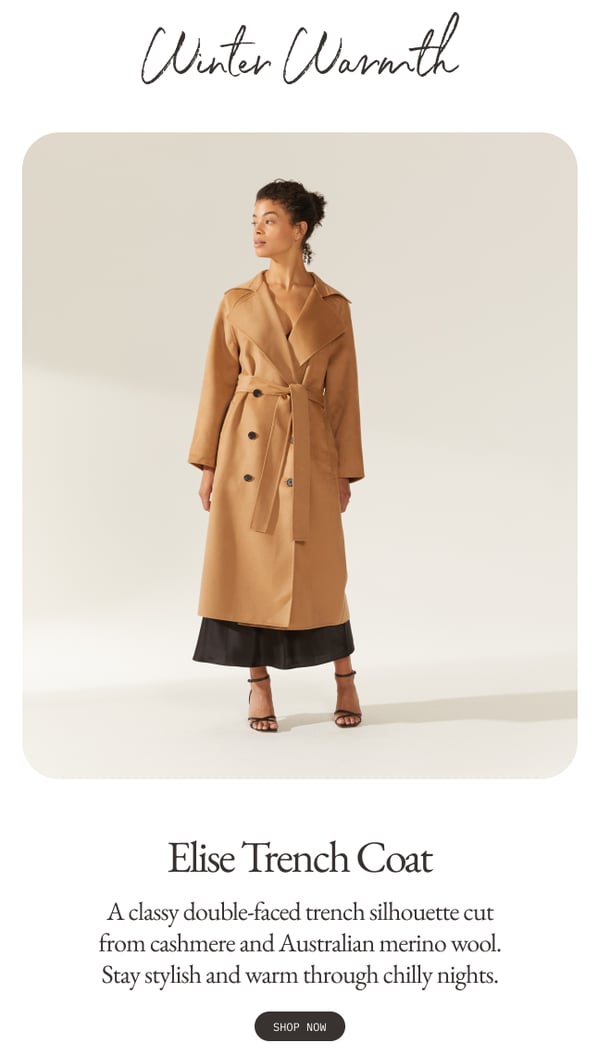
That doesn't mean other genders wouldn't love the coat. But Italic's data showed it resonated most with women, so that's how they targeted the campaign imagery and copy.
One important note: gender segmentation doesn't have to be binary. More brands now offer "prefer not to say" or non-binary options in their signup forms, then use other data points (browsing behavior, purchase history) to personalize product recommendations instead.
3. Income Segmentation
Income segmentation is where demographic targeting gets really interesting for ecommerce. Because it doesn't just change what you recommend. It changes how you frame the value.
But here's the twist: consumers are more complex than we marketers like to imagine.
It'd be easy to assume high earners gravitate toward luxury products. They've got money to burn, right? But research from found that personality matters too.
Extroverted people with lower incomes actually spend proportionally more on "status" products than introverts with similar earning power.
Still, there are obvious reasons why lower-earning consumers are more price-sensitive than their higher-earning peers. Target them with messaging that emphasizes attractive discounts and value.
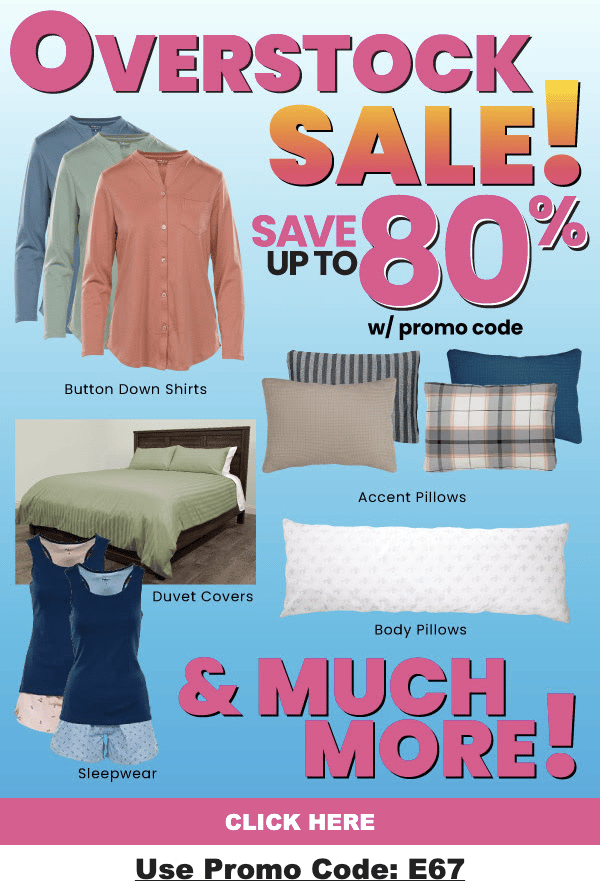
Ecommerce example: MyPillow leans hard into price-conscious messaging for budget-sensitive segments, with prominent discount callouts front and center.
On the flip side, higher earners often respond better to exclusivity than low prices. Scarcity and urgency work well here.
Plant retailer The Sill uses this approach with subject lines that emphasize limited availability rather than discounts:

Now, you probably don't have your subscribers' W-2s on file. And that's fine. Income segmentation in ecommerce is usually inferred rather than collected directly. Average order value, product price points browsed, and whether someone waits for sales are strong income proxies.
In Drip's segmentation builder, you can create dynamic segments based on AOV thresholds or total lifetime revenue. Someone who consistently buys $150+ items gets flagged as a premium shopper automatically, no survey required.
4. Education Level
Education level is a demographic segmentation example that most ecommerce brands overlook. But for certain verticals, it's a gold mine.
Here's why it matters: education level is inextricably linked with earning power.
Data shows that men with bachelor's degrees earn approximately $900,000 more in median lifetime earnings than high school graduates. For women with bachelor's degrees, that gap is $630,000. Graduate degrees widen the gap further: $1.5 million more for men, $1.1 million more for women.
So it's easy to see why brands might want to target college-educated consumers. The challenge? Targeting people based on degrees they earned years ago feels awkward. "Bet you had fun at school 18 years ago" isn't exactly compelling copy.
That's why smart brands focus on capturing educated consumers early with student and recent graduate discounts.
Ecommerce example: Cosmetics brand Origins offers special pricing for current students and recent graduates, building brand loyalty during a formative shopping period.

The logic is simple but effective: a discount today could translate into a lifetime of high-value repeat purchases from customers with growing earning potential.
This type of demographic segmentation is most commonly collected through post-purchase surveys or quiz questions. It's not something you'd put on a popup form, but a well-timed survey can capture it naturally.
5. Occupation-Based Targeting
For some brands, occupation-based segmentation is obvious. Selling hard hats and steel-toe boots? Target construction workers.
But what if you sell furniture, beauty products, or leisurewear? How does occupation influence what resonates?
The honest answer: it might not. As with any type of demographic segmentation, the only way to know for sure is to test. But some brands are seeing real success with occupation-based targeting.
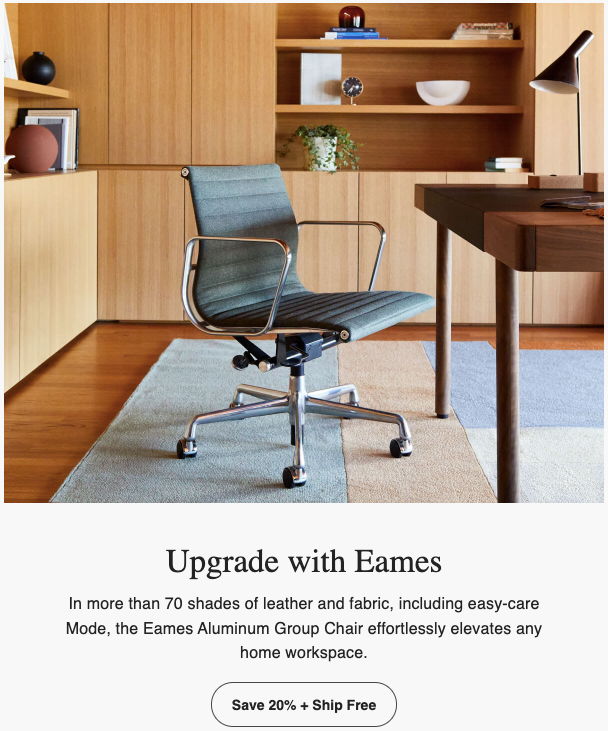
Ecommerce example: High-end furniture retailer Design Within Reach frequently targets remote workers with home office messaging.
In the post-pandemic era, remote work isn't as tightly tied to specific occupations as it once was. But research shows it's still most prevalent in white-collar roles like computer and mathematical occupations, business and financial operations, and management.
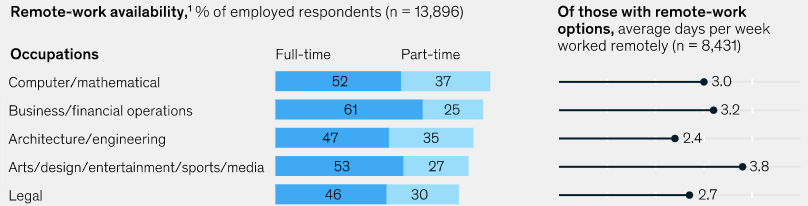
So it makes sense to target audiences in those occupations with remote-work-related messaging and products.
Occupation data is best collected through a single custom field in your signup form or a short preference quiz after subscription.
6. Marital and Family Status
Life stage is one of the most powerful demographic segmentation types for ecommerce. A new parent, a newlywed, and a single 30-year-old living alone have dramatically different buying priorities, even if they match on every other demographic variable.
The obvious application: if you sell baby products, target new parents. But family status segmentation goes deeper than that.
Data reveals that childless couples will, on average, outspend every other household type through 2030.
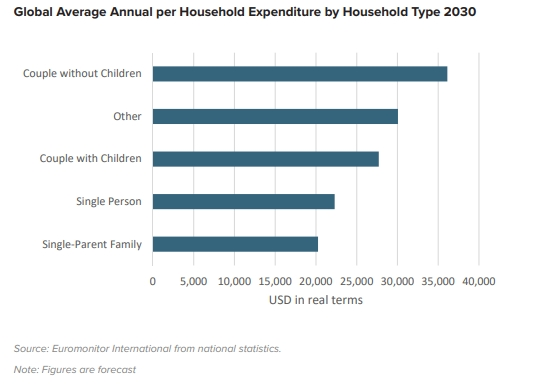
Why? As Euromonitor puts it: "No children and more time means couple-without-children households are able to lead expenditure-intensive lifestyles—more vacations, nights out, and spending on clothes, cars, and culture."
How do you capitalize on this? You could target niche and premium products at this high-spending demographic. Product launches and early-access campaigns work particularly well.
Ecommerce example: Eyewear brand Warby Parker uses early access campaigns to make high-spending segments feel like VIPs.

Offering select customers first dibs on new products creates exclusivity that drives engagement. And if they like what they see, it translates to sales.
Family status segmentation also prevents awkward moments. Sending baby product recommendations to someone who doesn't have kids (and maybe can't) isn't just ineffective. It's insensitive. Proper segmentation protects both your conversion rate and your brand reputation.
Marital and family status is classic zero-party data: people are happy to tell you if you ask at the right moment. A post-purchase survey question like "Who are you shopping for?" captures it without feeling intrusive.
7. Location and Nationality
Location-based demographic segmentation influences some of the most fundamental elements of your marketing:
- Campaign timing. If you're targeting West Coast customers with a campaign that launches at 8am EST, don't expect much immediate engagement.
- Language. Serving Spanish-speaking customers with English-only copy creates friction.
- Seasonality. Hot weather in New York doesn't mean it's summer in Melbourne.
These issues become especially important for international audiences. Consider Mother's Day: in most countries, it falls on the second Sunday of May. But the UK celebrates on the fourth Sunday of Lent—a completely different date.
Ecommerce example: The White Company segmented their audience by location to ensure their Mother's Day campaign reached UK customers on the correct date.
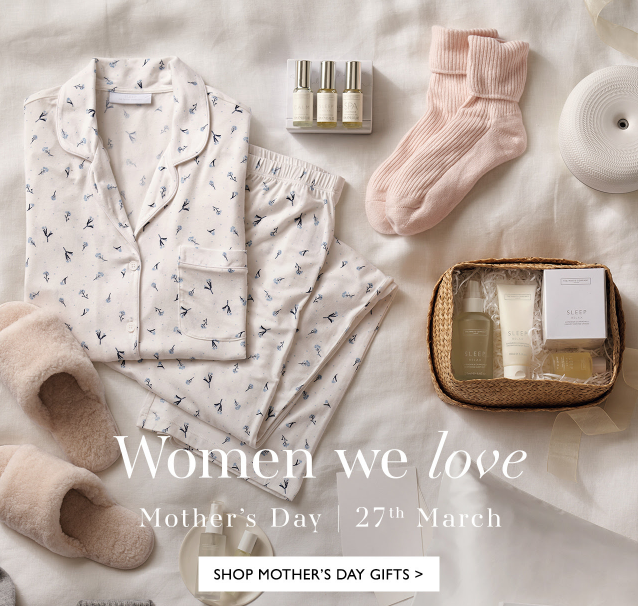
Without location segmentation, UK customers would have received the campaign weeks late—or not at all.
Location data is one of the easiest demographics to collect. Shipping addresses, IP geolocation, and ecommerce platform data (Shopify, WooCommerce, BigCommerce) all provide it automatically. No surveys needed.
With Drip's dynamic segmentation, you can create location-based segments that update in real time. When a customer updates their shipping address, they automatically move into the correct geographic segment.
How to Collect Demographic Data for Your Ecommerce Store
Knowing the types of demographic segmentation is step one. Actually having the data to segment on is step two, and it's where most brands get stuck.
The good news: you probably already have more demographic data than you think. And collecting the rest doesn't require long surveys or expensive research tools.
Here are five proven methods, ranked from easiest to most sophisticated.
1. Pull What Your Ecommerce Platform Already Knows
Your Shopify, WooCommerce, or BigCommerce store is already collecting demographic-adjacent data with every order: shipping address (location), order value (income proxy), and purchase history (product preferences that hint at age, gender, and life stage).
When you connect your store to Drip through its native integrations, this data syncs automatically into each customer's profile. You don't have to export CSVs or build manual imports. The data just flows in.
Start here. Audit what you already have before asking customers for anything new.
2. Add Custom Fields to Your Signup Forms
The simplest way to collect first-party demographic data is to ask for it at the point of signup. Add one or two optional fields to your email capture form: birthday, gender, or "Who are you shopping for?"
Keep it to one additional field beyond email. Two at most. Every extra field reduces your conversion rate.
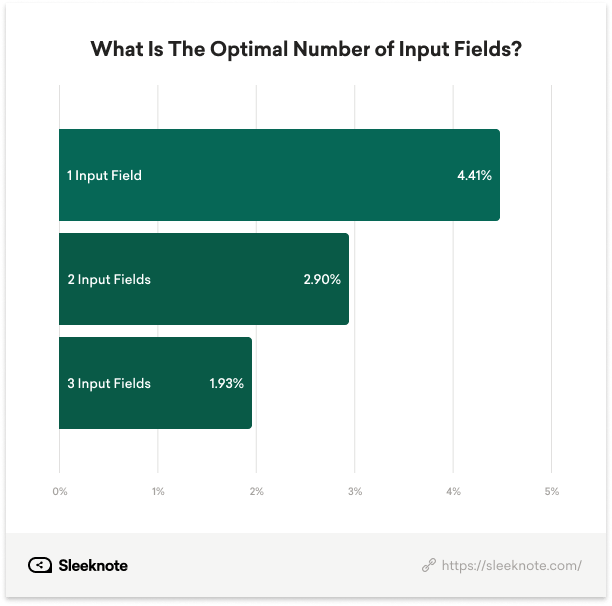
The key is picking the one demographic variable that matters most for your product line.
A kids' clothing brand should ask "Child's age range." A fashion brand should ask "Shopping for Men's, Women's, or Both." A supplement brand should ask "Age range."
3. Use Onsite Quizzes and Interactive Popups
This is where demographic data collection gets fun, both for you and your customers.
Interactive quizzes ("Find Your Perfect [Product]") collect rich zero-party data while delivering genuine value to the shopper. A skincare quiz asking about age, skin concerns, and lifestyle isn't just a data collection tool. It's a personalization engine that makes the customer feel seen.
Drip's onsite marketing tools include spin-to-win wheels, mystery offers, and multi-step popups that can collect demographic data in exchange for a discount or early access. The data maps directly to custom fields on each person's profile, ready for segmentation.
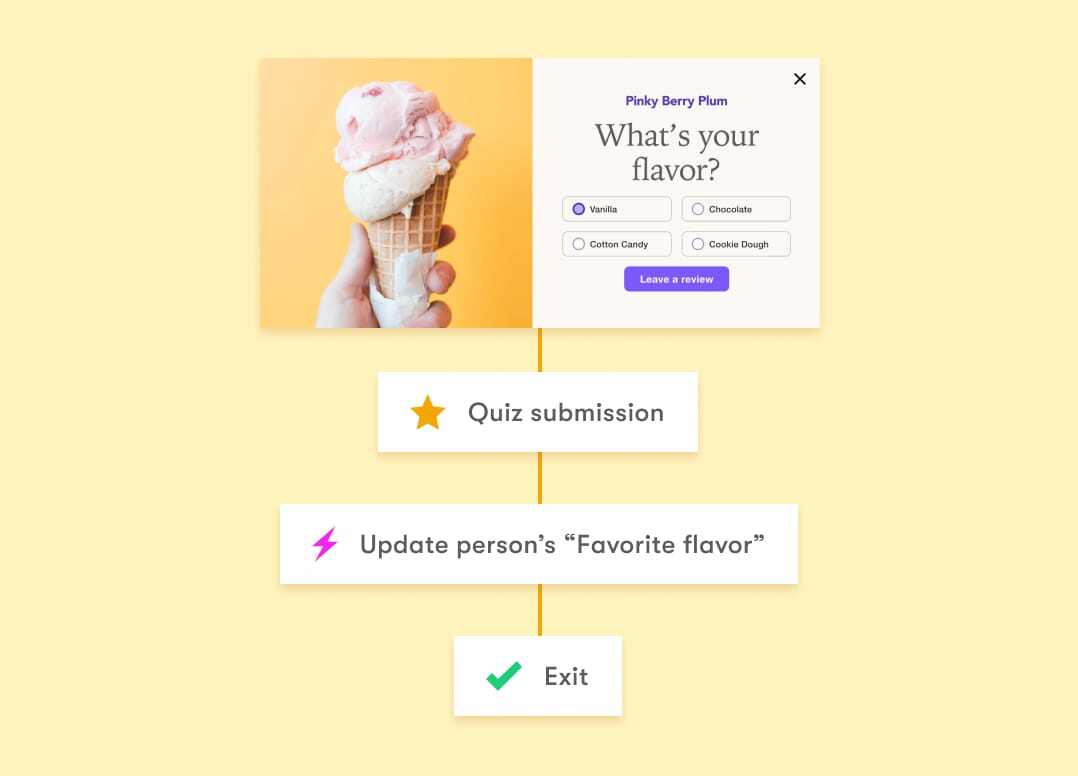
Mythologie Candles used this exact approach, which resulted in $1M in sales within 9 months, with 60-80% of revenue attributed to Drip.
4. Send Post-Purchase Surveys
The moment after someone buys is the moment they trust you most. That makes post-purchase emails the perfect vehicle for a quick demographic survey.
Keep it to two questions max. "Who did you buy this for?" and "What best describes your household?" are enough to unlock family status and shopping intent data.
Embed the questions directly in the email (clickable buttons or single-click links that auto-tag the response). Don't send them to an external survey tool. Every extra click loses respondents.
In Drip, you can build this into your post-purchase automation workflow. When someone clicks "I bought this for myself" vs. "It's a gift," Drip applies the corresponding tag automatically, which updates their segment membership in real time.
5. Build a Preference Center
A preference center is a dedicated page where subscribers manage their own profile: what they want to hear about, how often, and key details about themselves.
This is zero-party data in its purest form. Customers voluntarily tell you their age range, interests, family situation, and product preferences because it directly improves their experience.
Link to your preference center in your email footer, welcome series, and re-engagement campaigns. Frame it as a benefit: "Tell us a bit about yourself so we only send you the good stuff."
Over time, your preference center becomes the richest source of customer demographics in your entire tech stack.
How to Use Demographic Segmentation in Email Marketing
You've collected the data. Now what?
This is where demographic segmentation in marketing goes from theory to revenue. Here are five specific ways to use demographic data in your email campaigns, with the workflow logic behind each one.
Personalized Product Recommendations by Age or Gender
This is the highest-impact, lowest-effort win. If you know someone's age or gender, you can tailor product recommendations in every email you send.
Instead of showing "Best Sellers" to everyone, show "Best Sellers for Women in Their 30s" to that specific segment. The click-through rates jump because the products feel curated, not random.
In Drip, you can use Liquid templating to create one "smart" email that dynamically swaps product blocks based on demographic custom fields. One email template. Infinite personalized versions.
Income-Tiered Promotions
If your store carries products across multiple price points, income segmentation (or its proxy, average order value) lets you promote the right tier to the right people.
Send your premium segment early access to your luxury line with messaging about craftsmanship and exclusivity. Send your value segment a "Best Deals Under $50" roundup with free shipping incentives.
Both emails drive revenue. But they do it by speaking to each customer's reality, not by pretending everyone has the same budget.
Life-Stage Automated Flows
Family status and marital status data power some of the most sophisticated ecommerce personalization workflows.
A "New Parent" automated flow might look like this: welcome email with newborn essentials, followed by age-appropriate product recommendations that evolve as the child grows (0-3 months, 3-6 months, 6-12 months). Each email triggers based on the child's birthdate, a single custom field that powers an entire year of relevant content.
With Drip's visual workflow builder, you can set date-based delays that pause until a specific milestone (child turns 3 months, 6 months, etc.) and then automatically send the next email in the sequence. No manual intervention needed.
Birthday and Anniversary Triggered Emails
Birthday emails generate 481% higher transaction rates than standard promotional emails. And all you need is a single data point: date of birth.
The workflow is simple. Trigger an email 3-7 days before the subscriber's birthday with a personalized offer ("Happy early birthday! Here's 20% off, on us"). Follow up on the actual day with a reminder. Optionally, send a final "last chance" email the day after.
Anniversary emails work the same way: first purchase anniversary, subscription anniversary, or wedding anniversary (if you've collected it). Each one is an automated touchpoint that feels personal and drives repeat purchases.
Region-Specific Seasonal Campaigns
Location data lets you align your email calendar with your customers' actual weather, holidays, and seasons, not just your headquarters' climate.
Build segments for major geographic regions, then stagger your seasonal launches accordingly. Your Australian customers get your summer collection in November. Your Canadian customers get winter gear promotions in October. Your Southern California segment skips the heavy parka email entirely.
This also applies to holidays. Diwali promotions for your Indian customer segment. Lunar New Year for East Asian markets. Thanksgiving for US customers only. Demographic targeting by location prevents irrelevant sends and shows cultural awareness that builds brand loyalty.
Getting Started: A 5-Step Implementation Checklist
You don't need to implement all seven types of demographic segmentation at once. Start with one. Get a win. Then expand.
Here's your action plan:
Step 1: Audit What You Already Have
Open your ecommerce platform and your email tool. What demographic data are you already sitting on? Shipping addresses give you location. Order history gives you spending patterns (income proxy). Product categories purchased can hint at gender and life stage.
You might have more than you think.
Step 2: Add One Data Collection Point
Pick the single demographic variable that would most improve your email marketing. For most brands, that's age, gender, or "Who are you shopping for?"
Add it to your signup form, your welcome email, or deploy an onsite quiz. Just one new data point to start.
Step 3: Create Your First Demographic Segment
Build a segment based on the data you have. Even something as simple as "Customers in the US" vs. "Customers outside the US" counts. Or "Customers who've spent over $200" vs. "Customers under $50 AOV."
In Drip, segments are dynamic and retroactive. The moment you create a rule, it instantly populates with every existing subscriber who matches. No waiting.
Step 4: Build One Targeted Workflow
Create a single automated workflow that uses your new segment. A birthday email series. A location-specific seasonal campaign. Age-targeted product recommendations in your welcome flow.
Don't overthink it. One workflow that reaches the right people with the right message will outperform a dozen generic blasts.
Step 5: Measure, Learn, and Layer
After 30 days, compare your segmented campaign performance against your unsegmented sends. Look at revenue per recipient, click-through rates, and conversion rates.
Then add your next demographic layer. If you started with location, add age. If you started with gender, add family status. Each layer sharpens your targeting and improves your results.
Wrapping Up
Demographic segmentation isn't a new concept. But for most ecommerce brands, it's a massively underused one.
The seven types I covered (age, gender, income, education, occupation, family status, and location) give you a framework for understanding who your customers are. The collection methods give you ways to capture that data without friction. And the email strategies show you how to turn that data into revenue.
The brands that win at ecommerce personalization aren't the ones with the biggest lists. They're the ones who know their customers best and act on what they know.
Start with one segment. Build one workflow. See what happens.
Ready to Put This Into Action?
Drip makes it easy to collect demographic data through onsite forms and quizzes, build dynamic segments that update in real time, and trigger automated email workflows based on who your customers actually are. Every feature we mentioned in this guide is included at every plan level.
Start your 14-day free trial today. No credit card required.